Designing an operating system for a coworking space.
- Role
- Product designer
- Scope
- UI/UX design
- Team
- 1 PM, 1 engineer, 1 designer
What Nook is, who it is for, and what it has to do
Nook is software for running a coworking or flex-office space. It is built for the operator — the person behind the desk who says yes or no to whoever is standing in front of them, and who has to close the month on Friday. Nothing in it assumes a size: one forty-desk studio or a dozen buildings, location is a filter rather than a shape.
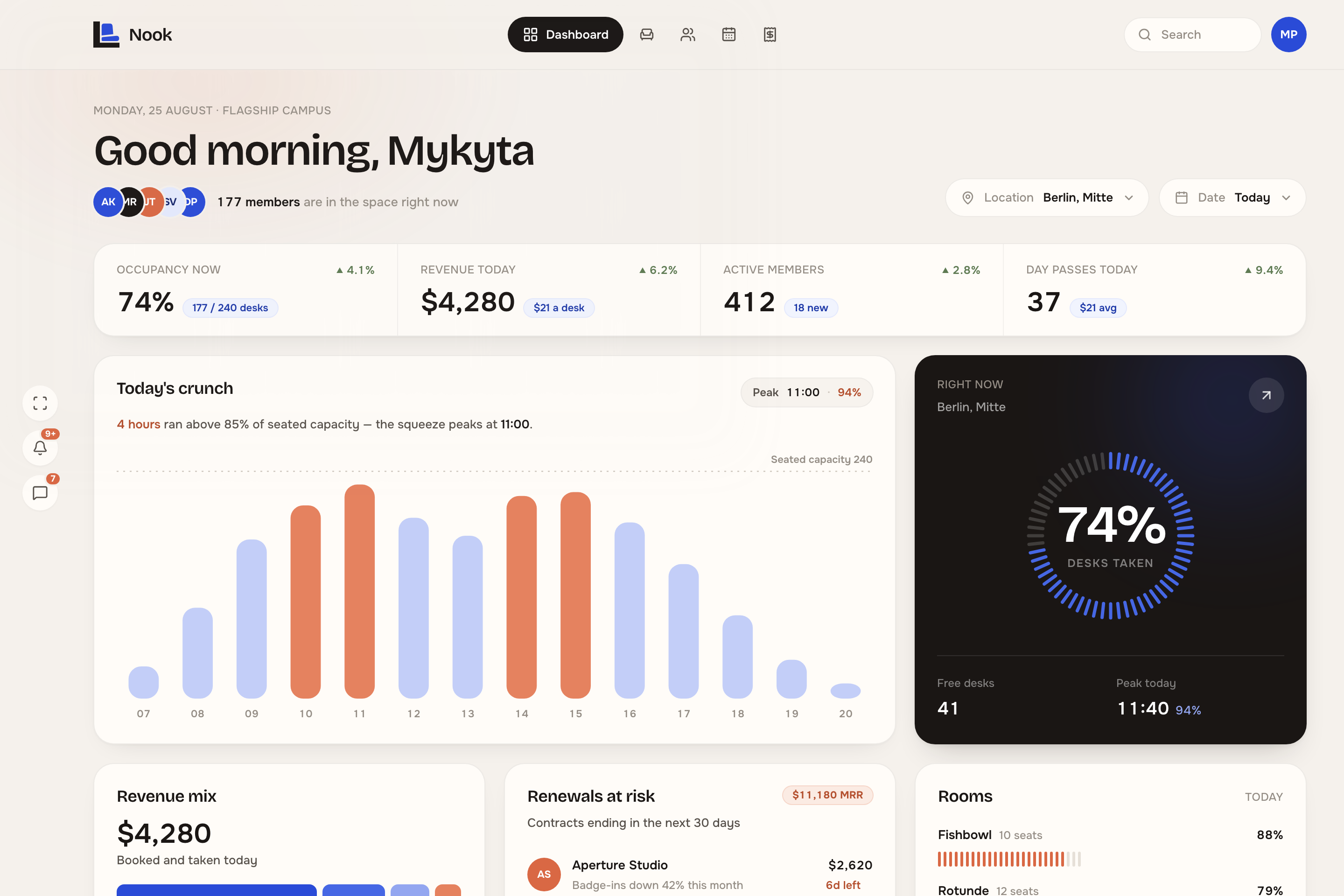
Desks live in a spreadsheet, rooms in a shared calendar, invoices in an accounting tool — and the fourth source of truth is walking the floor to find out which of the three is wrong. So every figure Nook prints has to be defensible on every screen it appears on. Occupancy is not typed in; it is 177 of 240 desks counted off the floor plan.
Five screens, one set of numbers.
- 01Overview
- What the space is doing right now
- 02Floor map
- Where every desk and every person is
- 03Members
- Who they are, across every site at once
- 04Bookings
- When the rooms are used, and when they are only held
- 05Billing
- What the month is worth, and who has not paid
The first page is a dashboard
Running a coworking space means watching a lot at once — every desk, every room, every member, every invoice. So the first page has to be minimal and dense at the same time. It is a cockpit: how full the space is, what it has earned, who is in it, the hours that squeeze and where the money comes from, all on one screen.
Two controls change what the page is answering for, and everything on it moves together.
Location. One space or six. Each site carries its own desk and room count, so the operator picks a building rather than remembering an id.
Date. The same page for today hour by hour, for this week, or for the month.
A live plan of every desk and room
The floor map is the building itself, drawn. Every desk carries its state — occupied, reserved, free or out of service — and the counts across the top say how the floor is doing without anyone having to add up squares. Everything on the plan opens.
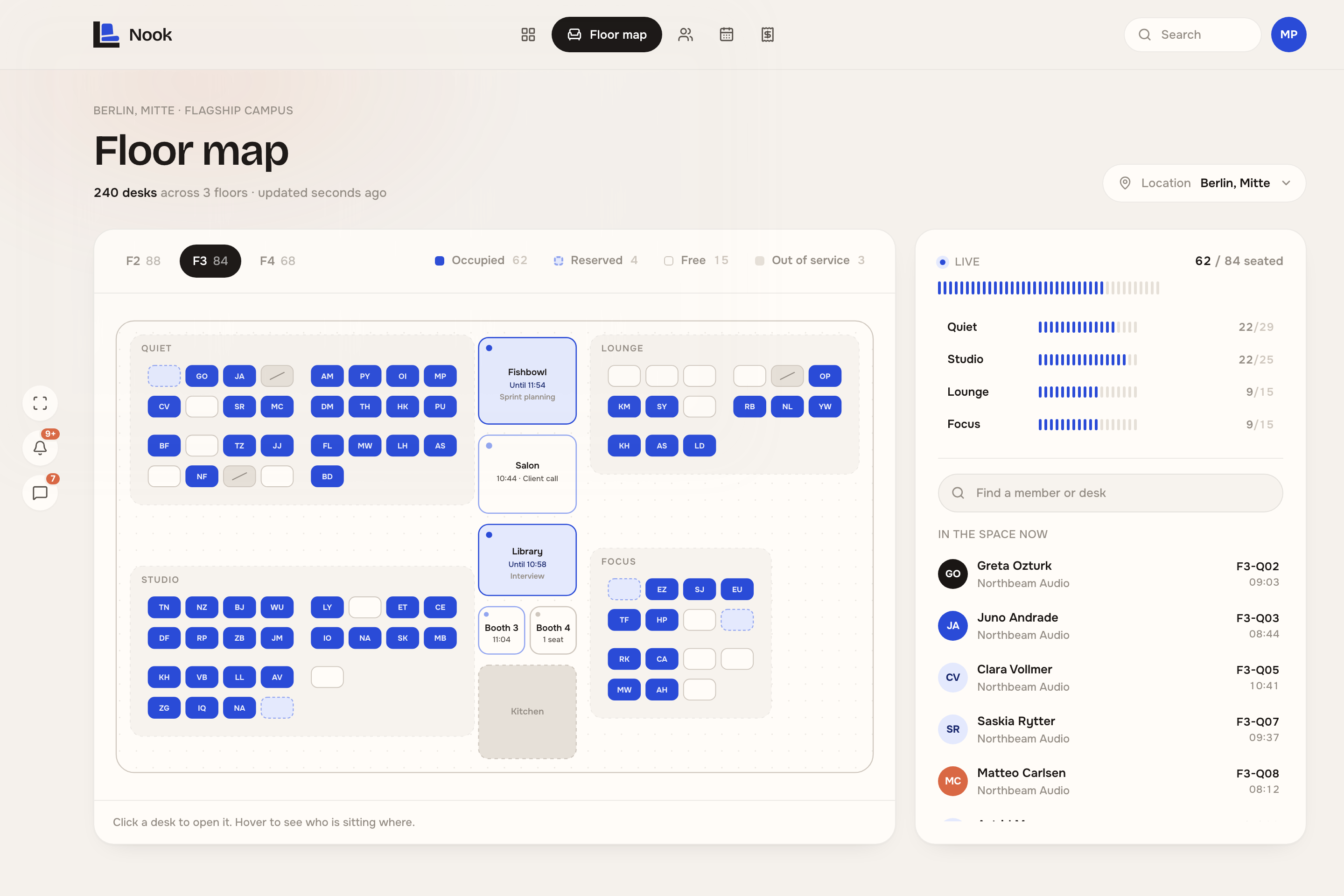
Two things the plan opens on a click.
A desk. Who is at it, what they pay for, when they badged in, and the hours it is booked for today. If something is wrong with the desk, the member is one tap away.
A room. Its whole day — and when it was booked and nobody came, who booked it, how long the seats have been idle, and a way to give them back to the floor.
Everyone who uses the space, in one list
Every member is in here, whichever building they use. A row carries the plan they pay for, the desk they are at right now if they are in, and how often they actually come. The roster beside it turns 1,184 people into what an operator plans with: which plans sell, and how much of the space is still unsold.
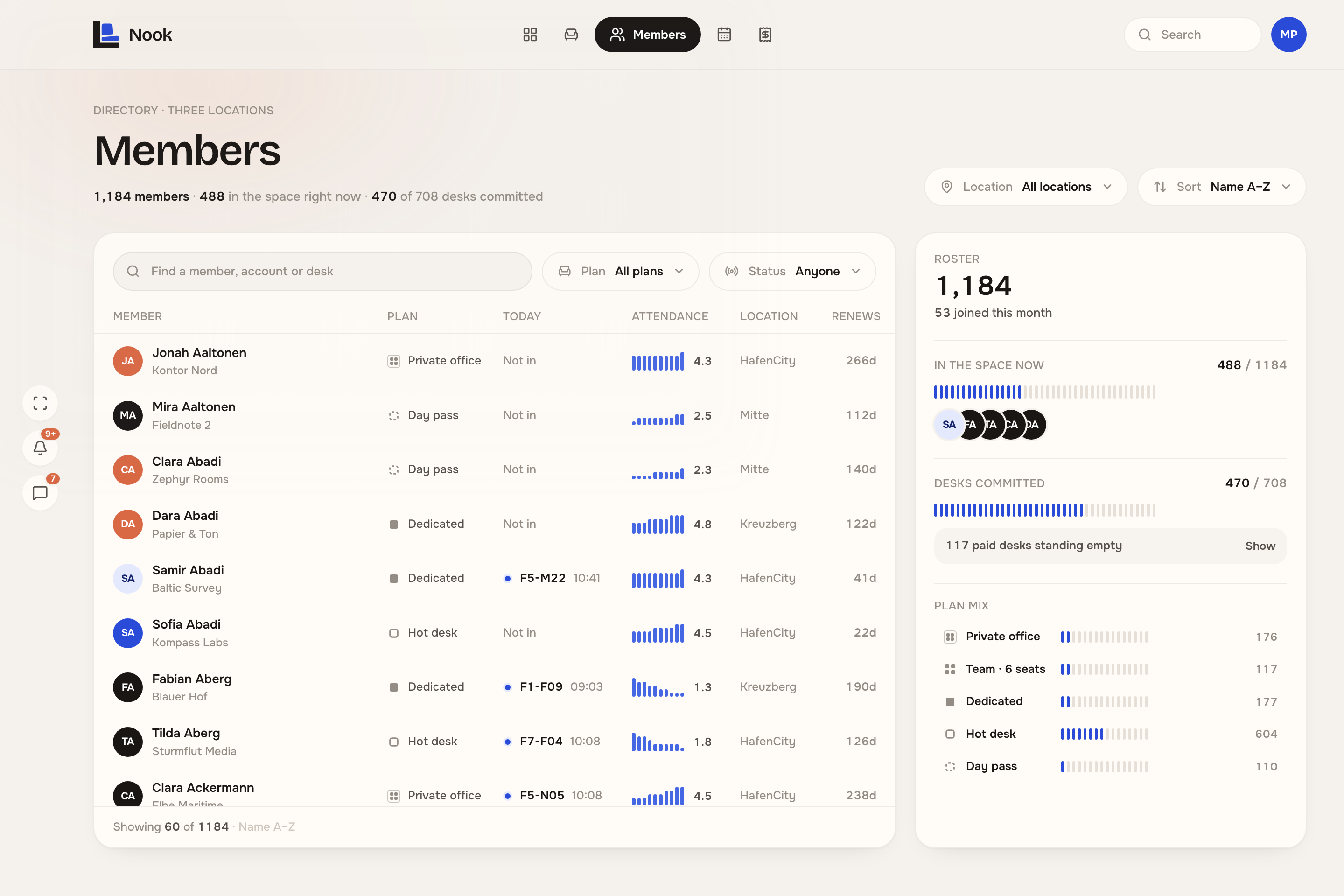
Two things the directory is for.
A member. The account they belong to, the plan, the desk they are sitting at, when they joined, when they renew, and a badge-in history that says whether the habit is holding or slipping.
The roster. 488 of 1,184 in the space, 470 of 708 desks committed, 117 paid for and standing empty — and a plan mix in which hot desks outsell everything else more than three to one.
What every room is booked for today
The schedule lays the day out room by room, with a line on the current minute. The header counts it — 114 bookings, 98.5 hours of room time held, three rooms sitting empty right now — which is what next month’s capacity and revenue get planned from. Orange is the only alarm on the screen: a room paid for with nobody in it.
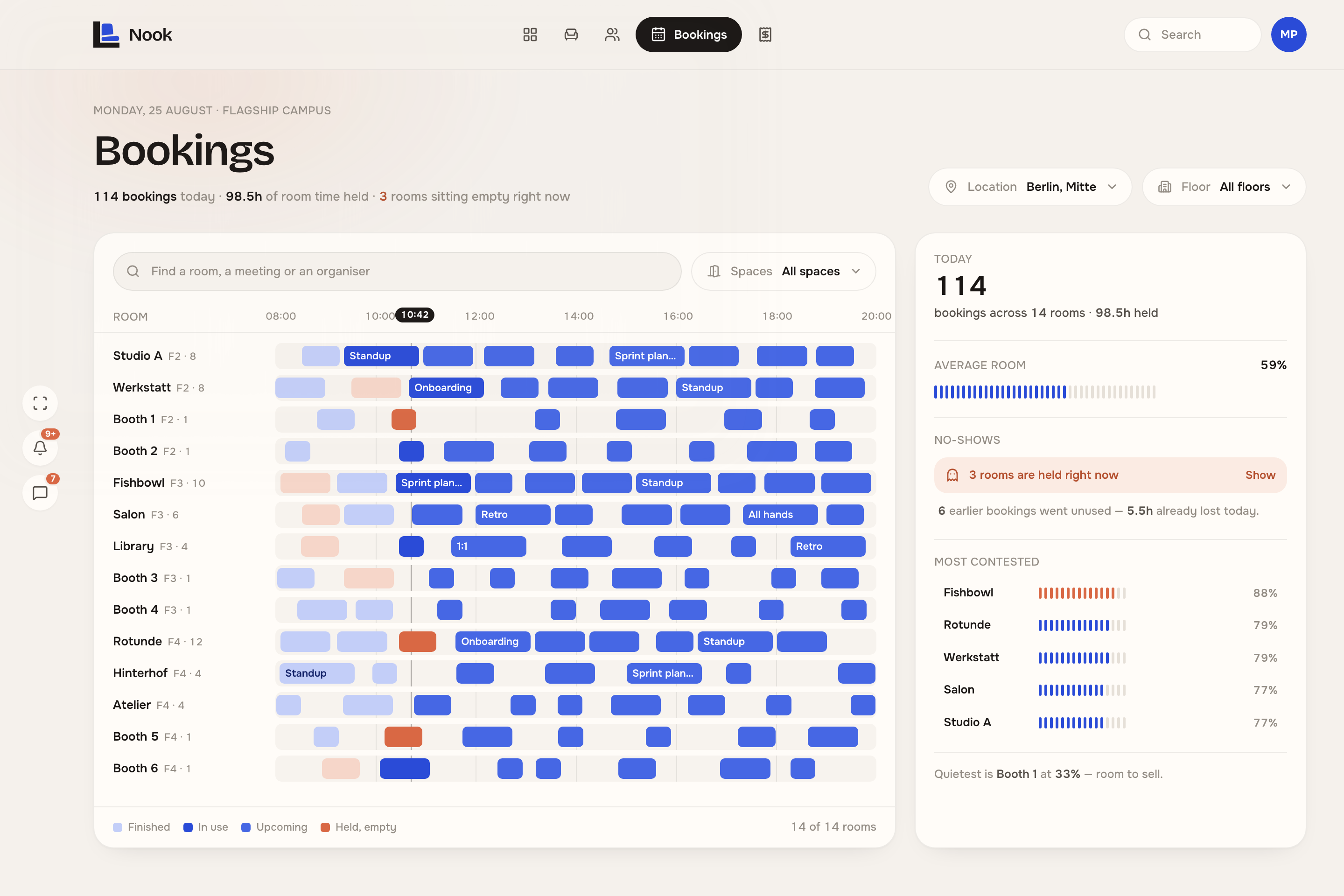
Two things a block opens.
A room. Its whole day and how much of it sold — 79% booked, nine bookings, 9.5 hours held and one of those hours wasted on somebody who never came.
A booking. Who booked it, how long twelve seats have been standing idle, and a way to give the rest of the slot back to the day.
The month’s money, account by account
Billing is the month on one page: what has been billed, what is still out, and how the recurring base moved since the first. Underneath it the ledger — every account with its plan, its seats, what it pays and whether the invoice has been settled. Opening one shows what they were charged for, and what to do about it.
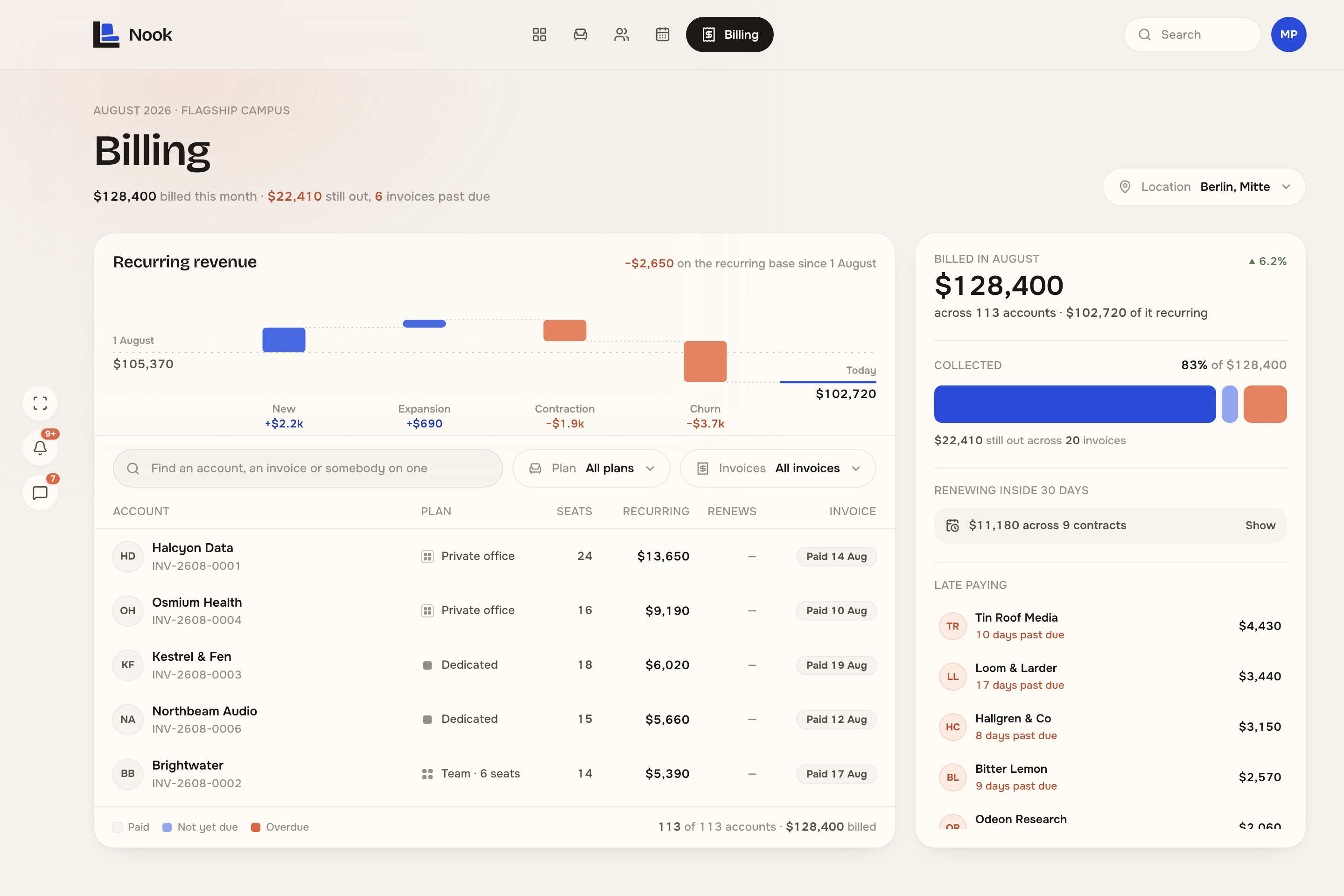
Two things an account opens.
An account. $3,280 a month at $410 a seat, three years with Nook, renewing in 83 days — and the eight people it covers, with who is in today.
Its invoice. What the $3,440 was made of — seats, an hour of room hire, no day passes — and, seventeen days past due, a reminder that never reads as paid.
Colours and typography
Aa 74%
Bricolage GrotesquePage titles, card titles, the big figures.Aa 1,184
OnestLabels, body, and every number on every screen.0123456789
Tabular figuresOn every number, so an animated value cannot jitter.The website
Designing the marketing site was part of the same scope.
Nook · Coworking operations platform, 2026
Product design, design system and front-end.